I Was Mass-Unfollowing on Twitter and Got Bored. So I Built a Tool.
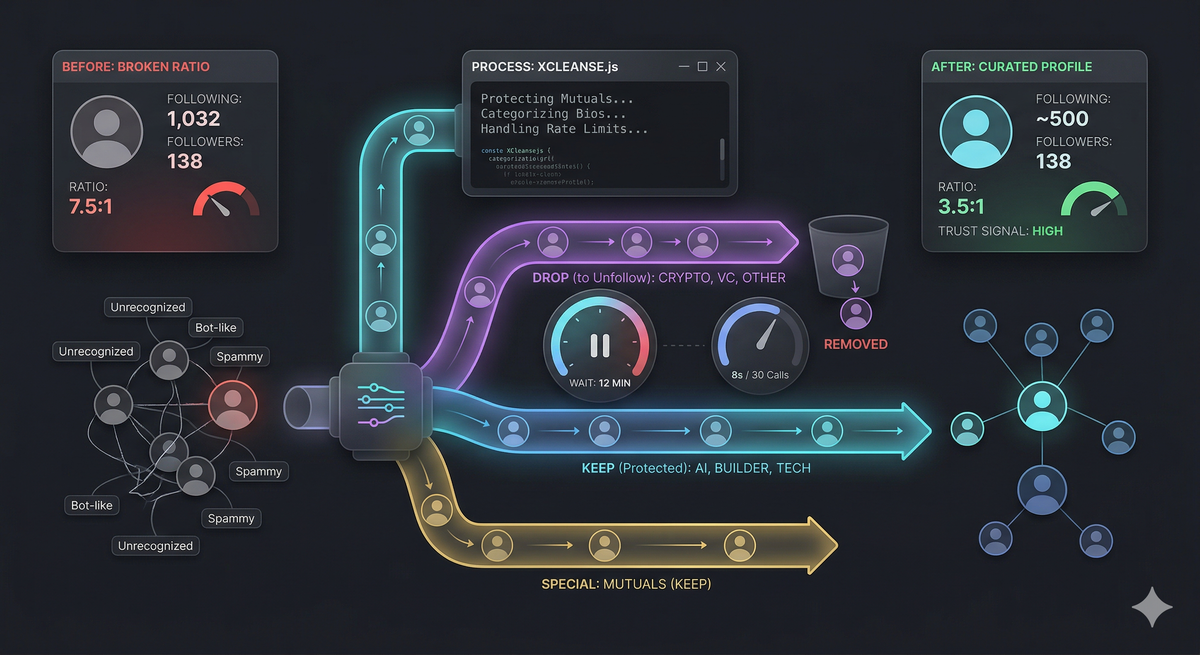
I've been trying to grow my Twitter account as an indie hacker. Posting about AI, sharing what I'm building, replying to people in the space. After a few weeks of consistent effort, I had 9,500 impressions. Sounds decent. But my follower count? Barely moved. Something was off.
Then I looked at my profile the way a stranger would. 1,032 following. 138 followers. That's a 7.5:1 ratio. If you saw that on someone's profile, what would you think? I'd think bot. Or at best, someone who follows everyone hoping for a follow back. Either way, I'm not hitting that follow button.
That ratio was killing me before anyone even read a single tweet.
The ratio problem nobody talks about
There's a lot of Twitter growth advice out there. Post consistently. Write good hooks. Reply to big accounts. All of that matters. But nobody talks about the silent killer: your following count.
When someone lands on your profile after seeing a good reply, they make a snap decision. They glance at your bio, your pinned tweet, and your numbers. If you're following 1,000 people and only 138 follow you back, it screams "this person follows everyone." It's a trust signal, and mine was broken.
Think about the accounts you respect on Twitter. Most of them have a following/follower ratio under 2:1. Many are under 1:1. It signals that people come to them, not the other way around.
I needed to get from 1,032 following down to around 500. That meant unfollowing roughly 537 accounts. Doing that by hand, one click at a time, scrolling through Twitter's laggy infinite list... I tried it for about 20 minutes and gave up.
The manual approach doesn't scale
Here's what unfollowing someone on Twitter manually looks like. You go to your Following page. You scroll down. You find someone you don't recognize. You click "Following," then confirm "Unfollow." Then you scroll more, because Twitter's virtualized list keeps loading as you go. And half the time the page jitters and you lose your place.
At best, you can do about 3 per minute. For 537 accounts, that's 3 hours of mind-numbing clicking. And you still need to actually decide who to keep and who to drop. Should I keep this crypto account? Is this person a mutual? Do they even post about AI?
I realized this needed to be automated. Not just the unfollowing, but the decision-making too.
Breaking it down into an actual system
The problem has three parts:
1. Who am I following?
Twitter doesn't give you a nice export of your following list. But under the hood, when you scroll through x.com/yourusername/following, your browser is making GraphQL API calls to Twitter's backend. These return JSON with everything: handle, display name, bio, follower count. All of it.
So step one was to paginate through that API and collect every account I follow. The API returns about 100 users per page with cursor-based pagination. For my 1,032 accounts, that was about 11 pages.
2. Who should I keep?
This is where it gets interesting. I didn't want to manually review 1,032 accounts. So I wrote a categorizer. It reads each account's bio and matches it against keyword lists: "ai," "machine learning," "founder," "indie hack," "developer," "saas," and so on.
Each account gets bucketed into a category: ai, builder, tech, vc, crypto, design, or other. Then I defined which categories to keep. For me, that was ai, builder, and tech. Everything else goes on the unfollow list.
But there's one more rule that matters a lot: never unfollow mutuals. If someone follows you back, unfollowing them is burning a bridge. So the tool also fetches your full follower list, cross-references it, and protects every mutual.
Here's what my breakdown looked like:
- builder: 350
- other: 340
- ai: 155
- vc: 72
- tech: 48
- crypto: 43
- personal: 14
- design: 10
With mutuals protected and ai/builder/tech kept, I had 537 accounts to unfollow and 485 to keep.
3. Actually unfollowing at scale
This is where Twitter fights back.
The unfollow API is straightforward: POST /i/api/1.1/friendships/destroy.json with the screen name. But Twitter rate limits this endpoint aggressively. Here's what I learned through trial and error:
- With a 1.5 second delay between unfollows, I hit a 429 (rate limited) after about 186 calls.
- With a 5 second delay, I got about 30 through before getting limited.
- After getting rate limited, you need to wait at least 10 minutes. Sometimes 15. A 60 second cooldown is not enough. A 5 minute cooldown is sometimes not enough.
- The sweet spot I landed on: 8 seconds between unfollows, 12 minute cooldown when rate limited. This gets through about 30 accounts per burst, then pauses, then goes again.
For 537 unfollows, that's roughly 90 minutes of total runtime. You start it, go make dinner, and come back to a clean profile.
The gotchas that cost me hours
If you're building anything on top of Twitter's internal APIs, here are the traps I walked into so you don't have to.
Field paths are not where you'd expect. The user object has a nested structure. screen_name and name live in user.legacy, not user.core. I spent a full data collection cycle getting null handles because I was reading from the wrong path. Had to re-collect everything.
TimelineTerminateTimeline doesn't mean stop. When paginating through the Following list, Twitter sends back instructions. One of them is TimelineTerminateTimeline. I initially treated this as "you've reached the end." It's not. It's a directional signal (Top/Bottom) and you should only stop when there's no more bottom cursor or zero new users.
The DOM won't help you. My first attempt was to scroll the Following page and click unfollow buttons programmatically. Twitter uses a virtualized list that doesn't respond to window.scrollBy(). The elements aren't in the DOM until they're visible. Using the API directly is the only reliable approach.
Bearer tokens are public. Twitter's web app ships with a hardcoded bearer token that's the same for everyone. The actual authentication comes from your session cookies (the ct0 CSRF token specifically). This means you can make authenticated API calls from the browser console without any API keys.
What I shipped
I packaged all of this into a single JavaScript file you paste into your browser console. No npm install, no API keys, no OAuth setup. You're already logged into Twitter, so the script uses your existing session.
The flow is interactive:
- It fetches your full Following and Followers lists
- Categorizes everyone by bio keywords
- Shows you exactly who it plans to keep and who it plans to unfollow
- You review the lists (there's a
showKeep()andshowUnfollow()command) - You type
execute()to start, and it handles the rate limiting automatically
You can pause and resume anytime. It logs progress every 10 unfollows. And it saves state so if your tab crashes, you know exactly where you left off.
The categories are fully customizable. If you're in the crypto space, just change the keep list to ['crypto', 'tech', 'builder']. If you want to keep VC accounts too, add 'vc'. The keyword lists are editable so you can tune the categorization to your niche.
The repo is here: https://github.com/yashk1998/XCleanse
The results
My following count went from 1,032 to 495. The ratio went from 7.5:1 to about 3.5:1. Still not perfect, but dramatically better. More importantly, I kept every mutual follow and every account in my niche.
The change was immediately visible on my profile. When someone checks me out after I reply to their tweet, they see a number that looks normal instead of one that looks desperate. That small visual shift matters more than most people realize.
Combined with shorter, punchier replies (under 25 words, not paragraphs) and standing tweets that show personality instead of product pitches, the growth trajectory started looking different.
Why I'm sharing this
Because I know there are other indie hackers, devs, and builders sitting at 800+ following with 100 followers, wondering why their impressions aren't converting. The advice is always "write better content." And that's true. But fixing your ratio takes 90 minutes and removes a silent blocker that no amount of good content can overcome.
If you're building in public and trying to grow on Twitter, your profile is your landing page. And right now, your following count might be the broken CTA button that's tanking your conversion rate.
Clean it up. Keep your people. Drop the noise.